How AI effects recruitment

Hiring in tech has never been more complex. To understand how recruitment is changing, and what it takes to get it right, we spoke with Markéta Bártová, HR Manager at Nuvolar, a B2B tech consultancy specialising in Salesforce and digital transformation. In this interview, she shares her views on AI in recruitment, balancing speed with quality, and the skills that will define the recruiter of the future

“AI is transforming recruitment at a rapid pace. How do you think it has changed the role of recruiters in the IT sector, and where do you believe human recruiters still add the most value?”

AI has fundamentally changed recruitment, particularly in the IT sector, but I see it as an enabler rather than a replacement for recruiters.

Recruitment has always involved many repetitive and administrative tasks: candidate sourcing, scheduling interviews, screening CVs, writing job descriptions, and managing communication. AI allows us to automate much of this work, which improves efficiency and frees recruiters to focus on higher-value activities.

Because of that, I believe the recruiter’s role has become much more strategic. Today, it’s not just about filling vacancies; it’s about understanding the business, anticipating future hiring needs, advising hiring managers on the talent market, and building long-term talent pipelines. Recruiters need to think beyond the immediate role and understand how hiring decisions support the company’s overall objectives.

I also believe recruiters need to become proficient in using AI. It’s an important tool for increasing productivity and making data-driven decisions, but it’s still the recruiter who provides the critical thinking, creativity, and judgment that AI cannot replace.

The greatest value human recruiters bring is in building relationships and making nuanced decisions. Assessing motivation, adaptability, communication style, and cultural contribution requires empathy and context, qualities that AI can support but cannot fully replicate. Especially in fast-paced environments, recruiters need to adapt their approach because what works for one role, one team, or one moment in the market may not work for another.

Ultimately, I see the future recruiter as a strategic business partner who combines AI-driven efficiency with human insight to attract and hire the right people.


“In a fast-growing tech company, speed is often critical. How do you balance hiring quickly without compromising the quality of the candidates you bring into the process?”


In a fast-growing tech company, speed is critical, but speed without structure often leads to poor hiring decisions. The key to balancing speed and quality is preparation rather than rushing.

It starts before a vacancy is even opened. A well-defined recruitment process is essential: clear roles and responsibilities, agreed timelines, efficient interview stages, and alignment with hiring managers on what success looks like for the position.

It’s also important to invest time upfront in understanding the business context, not just the technical requirements. The better you understand the project, the team, and the challenges the new hire will solve, the better you can represent the opportunity to candidates and attract people who are genuinely aligned with it.

Another important element is building talent pipelines. Instead of starting every search from zero, it’s much more effective to maintain relationships with strong candidates over time. That way, when a role opens, you already have people in mind who could be a great fit, which significantly reduces time-to-hire without sacrificing quality.

Finally, AI and automation also play an important role. They help streamline administrative tasks such as sourcing, scheduling, and screening, allowing recruiters to spend more time evaluating candidates, advising hiring managers, and creating a better candidate experience.

Ultimately, speed is the outcome of having the right processes, strong collaboration with the business, and proactive talent acquisition, not of skipping steps in the hiring process.


“When recruiting for highly technical roles, what do you look for beyond technical expertise? How do you assess whether someone is likely to succeed in the role?”


When recruiting for highly technical roles, technical expertise is obviously important, but it’s only one part of the equation. We believe the best candidates combine strong technical skills with the right mindset and soft skills.

Beyond technical ability, we look for qualities such as communication, adaptability, curiosity, collaboration, and a willingness to learn. Technology evolves so quickly that no one can know everything. What really makes someone successful is their ability to continuously learn, embrace change, and work effectively with others in a fast-paced environment.

We also pay close attention to a candidate’s attitude ( for me this is one of the most important things)  Experience and technical knowledge can be developed through training, mentoring, and hands-on experience. However, qualities such as ownership, openness to feedback, teamwork, and a genuine willingness to contribute are much harder to teach.

That’s why we assess not only whether a candidate can do the job today, but also whether they have the potential to grow with the company. We look for examples of how they’ve handled change, learned new technologies, collaborated across teams, and solved challenges in previous roles.

Ultimately, the strongest hires are those who combine solid technical capabilities with a growth mindset and an attitude that aligns with the company’s values. Those are the people who are most likely to succeed and continue adding value over the long term.

How do you build credibility with hiring managers, particularly when your recommendation differs from theirs or when you need to challenge their hiring decisions?

Building credibility with hiring managers starts with building trust. I personally see the relationship between recruiters and hiring managers as a partnership rather than a transactional process.

Recruiters are in constant contact with the talent market. We speak with candidates every day, understand market trends, know what candidates are looking for, how competitive certain skill sets are, and what expectations are realistic in terms of compensation, flexibility, and career opportunities. That market knowledge is one of the greatest values we bring to the business.

At the same time, it’s essential to understand the hiring manager’s perspective. We need to have a clear understanding of the project, the team’s objectives, and what success looks like in the role. The better we understand the business, the better we can represent the opportunity to candidates and provide informed advice to hiring managers.

When our recommendation differs from the hiring manager’s, we focus on facts rather than opinions. We share market insights, candidate feedback, and recruitment data to explain why certain expectations may need to be adjusted. Sometimes a hiring manager may be looking for a profile that is extremely rare or expecting a combination of skills that isn’t readily available in the market.

In those situations, our role is to challenge constructively. Instead of simply saying, “This profile doesn’t exist,” we propose alternatives—whether that’s prioritizing the most critical skills, considering candidates with strong learning potential, or adjusting the hiring criteria based on market realities.

Ultimately, credibility is built by consistently providing honest market insights, communicating transparently, and helping hiring managers make informed decisions that balance business needs with the realities of the talent market.

“Looking ahead three to five years, what skills do you think recruiters will need to remain valuable as AI becomes increasingly integrated into recruitment?”

Looking ahead over the next three to five years, I don’t think recruiters will be replaced by AI, but I do believe the role will shift significantly—and we’re already seeing that happen today.

The recruiters who will remain most valuable will be those who combine strong human judgment with the ability to use AI effectively. They will need to understand how to leverage AI for sourcing, screening, interview scheduling, and other administrative tasks so that repetitive work is automated, allowing them to focus on higher-value activities.

Those higher-value activities include building strong relationships with candidates, hiring managers, and key stakeholders, as well as developing a deep understanding of the business. Recruiters will increasingly become strategic partners and trusted advisors rather than simply filling open positions. They will provide insights into talent market trends, support workforce planning, and help shape hiring strategies that align with long-term business goals.

Another essential skill will be data literacy. AI will generate a wealth of recruitment insights, but recruiters will need to interpret that data, make informed decisions, and clearly communicate the value of those insights to the business.

Strong communication and influencing skills will also become even more important. Recruiters need to conduct effective interviews, negotiate offers, tell compelling stories about the employer brand, and engage top talent. Ultimately, they are ambassadors for their organization and play a key role in attracting and securing the best candidates.

In addition, recruiters will need a solid understanding of the legal, ethical, and privacy considerations surrounding AI in recruitment. As AI becomes more integrated into hiring processes, ensuring fairness, transparency, and compliance will be critical.

Finally, adaptability and continuous learning will be essential. AI is evolving rapidly, and successful recruiters will be those who embrace new technologies, continuously develop their skills, and use innovation to improve recruitment processes and keep their organizations competitive in the talent market.

Check out our video on Youtube: In this video, we break down what tech recruiters are really looking for in today’s market. From key skills and mindset to the most common interview mistakes that can cost you the job. We also explore the latest trends in tech recruitment, including how hiring processes are evolving for roles like Salesforce consultants, developers, and other engineering profiles. If you want to improve your chances of getting hired, understand what companies expect, and avoid typical pitfalls in technical and behavioral interviews, this video is for you.

 

Digital Transformation Roadmap Guide

Transformation ‌often ‌stalls ‌not from faulty ambition at all. The real snag comes when a business tries overhauling systems processes data and teams in one go with no sequence laid out. Guides on enterprise digital transformation roadmaps ought to move past sketching some future picture they need to steer leaders toward what shifts first what stays protected and how progress continues without breaking the operations still required daily. For mid-market and enterprise groups the hurdles rarely stay technical alone legacy platforms compliance needs broken workflows regional setups and clashing priorities from leaders determine what can actually happen. Only when a roadmap takes those limits into account does it prove its value turning potential obstacles into choices made on purpose.

What an enterprise digital transformation roadmap guide should actually do

People ‌mix ‌up ‌roadmaps and project plans all the time. Not the same creature at all. Project plans keep tabs on tasks, timelines, owners. A transformation roadmap sketches direction over business capabilities, technology architecture, governance, data, change management. Different animal entirely. Why bother with the split? Enterprise transformation never amounts to one program ending at some neat finish line. It amounts instead to a coordinated shift in how the organization works day to day. Roadmaps stuck on implementation milestones often glide past tougher questions: which processes merit standardization; where custom development yields real advantage; how data flows between platforms; what volume of change the organization can stomach in any given phase. Strongest roadmaps link executive intent to delivery realities. Leadership gains a measure for progress that goes past software go-live dates. Technical teams grasp the business outcomes that sit behind each choice.

Start with business friction, not with tools

Many transformation efforts begin with a platform decision. That can work in contained scenarios, but at enterprise scale it usually narrows the conversation too early. A stronger starting point is business friction.

Where is revenue slowed by disconnected systems? Which manual processes create risk, delay, or poor customer experience? Where does compliance depend on spreadsheets and individual workarounds? Which teams are producing data but not using it to guide action?

Questions ‌like ‌these ‌lay bare what actually drives any shift plan. They also sidestep that usual pitfall of dumping effort into flashy surface fixes while workflow snarls or connection shortfalls or oversight messes linger untouched behind the scenes. In fields locked by rules or operational knots this weighs heavier still. Healthcare outfits aviation crews financial houses manufacturing lines none can sketch plans on loose talk of updates. What they require instead is a run of steps that respects checks holds systems steady treats sensitive records with care and protects day to day flow all along.

The five layers of a credible roadmap

An enterprise roadmap becomes more reliable when leaders evaluate it across five connected layers.

1. Strategy and outcomes

The roadmap should define what success means in operational terms. Faster quote-to-cash, stronger service responsiveness, lower administrative effort, better forecasting accuracy, reduced compliance exposure, or more usable customer intelligence are all stronger anchors than broad innovation goals.

This is also where trade-offs should be explicit. Not every transformation initiative should maximize speed. In some environments, governance and resilience matter more than rapid rollout. In others, commercial pressure may justify a more aggressive release model in lower-risk areas.

2. Process and operating model

Technology rarely fixes a broken operating model by itself. If teams follow inconsistent workflows, duplicate handoffs, or rely on informal decision-making, new systems can simply digitize the confusion.

Roadmaps need a clear view of which processes should be harmonized across the enterprise and which should remain flexible by market, product line, or business unit. Standardization creates efficiency, but too much of it can ignore legitimate local complexity. This is where many programs overcorrect.

3. Platforms and architecture

Most enterprise environments are not starting from zero. They include ERP, CRM, data warehouses, legacy line-of-business systems, third-party applications, and custom tools developed over time. The roadmap should define how these systems will interact in the future, not just which new platform will be introduced.

This includes integration priorities, technical debt reduction, security requirements, and decisions about where configuration is enough and where tailored development is justified. Off-the-shelf tools can accelerate delivery, but they are not automatically the best fit for specialized operational needs.

4. Data and intelligence

Digital transformation without a data strategy becomes expensive digitization. The roadmap should identify which data domains matter most, where quality issues affect decisions, and how information should support both operational workflows and executive insight.

For many organizations, this is also the point where AI becomes relevant. But AI should not be treated as a separate innovation track detached from process and data maturity. If the underlying data is fragmented, inconsistent, or poorly governed, advanced models will amplify noise rather than improve performance.

5. People, governance, and adoption

Change management is often treated as a late-stage communication exercise. In reality, it belongs at the center of the roadmap. Enterprise programs succeed when governance is clear, sponsorship is visible, and users understand how the new model improves work rather than just changing it.

Adoption plans should reflect real organizational dynamics. A sales team, an operations team, and a compliance team will respond to change differently. Training, support, and rollout design should reflect that.

How to build the roadmap in phases

A useful enterprise digital transformation roadmap guide should help leaders think in phases rather than in one large release. This reduces risk and improves learning.

Phase one: assess and prioritize

In ‌this ‌phase ‌an honest baseline takes shape through process mapping and stakeholder interviews along with system audits plus assessments of data maturity and capability gaps all fitting in at this point. No one needs massive sets of documentation here though. Pinpointin the few constraints and opportunities that shape every decision downstream is what matters. At this stage executive alignment turns critical. One group sees the transformation as cost-efficiency while another views it as a growth platform and that split can destabilize the roadmap fast.

Phase two: design the target state

The ‌organization ‌here ‌spells out connections among workflows to come along with platforms data flows and governance. Business owners need inclusion too as they know where standardization helps and where flexibility matters more. Ambitious yet practical the target state must allow sequencing. Brittle results often follow if every core system swap must happen first before value emerges.

Phase three: deliver in value-based waves

Tied ‌to ‌business ‌outcomes the strongest roadmaps split delivery into waves. One might land on customer operations another on commercial visibility service efficiency follows and compliance with reporting comes next. Momentum builds from this the organization gets evidence that transformation works it also eases adjustments from what early work teaches. Enterprise programs rarely unfold exactly as planned a roadmap should expect that.

Phase four: optimize and scale

Once the first waves are live, attention should shift from deployment to performance. Are teams using the system as intended? Are integrations reliable? Is data supporting better decisions? Are manual workarounds returning?

This phase separates organizations that implement technology from those that build a lasting digital operating model. Ongoing optimization, support, and governance are not post-project extras. They are part of the transformation itself.

Common mistakes that weaken the roadmap

The first is treating transformation as an IT initiative with business sponsorship added later. Enterprise change needs shared ownership from the start.

The second is underestimating integration. Many roadmaps look clean until real system dependencies emerge. If integration architecture is vague, delays and cost expansion follow quickly.

The third is chasing too many priorities at once. A roadmap should clarify what will not happen now, not just what will happen next.

The fourth is assuming adoption will take care of itself if the technology is good enough. Even well-designed platforms fail when incentives, training, and management behaviors do not shift with them.

What strong leadership looks like during transformation

Leaders do not need to manage every workstream, but they do need to keep the roadmap anchored to business value. That means asking whether each phase improves decision-making, customer experience, operational control, or scalability in a measurable way.

It also means resisting false certainty. Some decisions need conviction. Others need testing. The most effective transformation leaders know the difference. They create enough structure to move with confidence and enough flexibility to respond to what the organization learns along the way.

For companies navigating complex platforms, regulatory obligations, and cross-functional change, the right partner can make that balance easier to achieve. Nuvolar approaches this work with technology, data, and human insight aligned to the realities of enterprise execution.

As we all know of course roadmap is only valuable if people can use it to make better decisions tomorrow than they made yesterday. Build it with that standard, and transformation becomes less about big promises and more about smart, scalable, and impactful progress.

Zoho Development for Complex Operations

The Strategic Reality of Zoho Development: From Configuration to Execution Zoho looks simple on the surface yet your operation rarely stays that way. Configuration runs its course at some point. Then zoho development turns from a technical checkbox into a real business decision. Mid-market teams and enterprise groups handling compliance, multi-step workflows, legacy systems, cross-functional data, all face the same truth. The value lies not in piling on more tools but in shaping Zoho around how work actually happens.

Zoho earned its spot by spanning a broad operational footprint. CRM, finance, customer service, analytics, marketing, custom apps, automation, all sit inside one environment. Transformation leaders confront a sharper question though. It is not whether Zoho offers features. It is whether those features deliver the precision teams require without adding new friction.

What zoho development actually means

Zoho development means extending, adapting, integrating the platform beyond basic setup. Custom functions, bespoke modules, tailored interfaces, API-based integrations, data architecture, role-based permissions, workflow orchestration, custom applications built in Zoho Creator.

Practically this is how a sales process carrying complex approval logic gets modeled correctly. How service teams see the right data at the right moment. How finance, operations, commercial teams stop working from conflicting records. How platform owners avoid the slow drift that turns a promising implementation into another underused system.

Why does any of this matter?

Most operational headaches do not stem from a missing button. They stem from mismatches between software design and business reality. When the platform fails to reflect your processes people create workarounds. Workarounds turn into risk, lost visibility, inconsistent execution.

Where standard Zoho setup starts falling short

Straightforward use cases benefit from native configuration. A growing company with a simple pipeline and limited integration needs often finds standard modules, predefined automation, a few dashboards sufficient. That is fine. Not every organization requires heavy customization.

The equation changes once multiple business units enter the picture. Region-specific rules. Regulated data. A service model that crosses departments. Standard setup then feels too rigid in one area, too loose in another. Teams cannot enforce process discipline or they get pushed into awkward exceptions that undermine adoption.

A healthcare organization needs different visibility rules for clinical, operational, commercial users. A manufacturer needs CRM data tied to order status, support history, field activity. Aviation or insurance teams need auditability and workflow controls that standard configuration cannot fully deliver. In each case zoho development lets the organization align the platform with operational reality rather than asking the business to simplify itself for the software.

The business case for custom development

The strongest case for development is rarely about adding complexity. It is about removing complexity for users while increasing control for the business.

Well-executed customization shortens handoffs. It reduces manual entry. It improves forecasting. It gives leadership a more reliable view of performance. It strengthens governance as well. Approval rules, validation logic, system permissions designed with intention mean teams make fewer avoidable errors and compliance teams gain confidence in the process.

Customization is not automatically the right move. Too much of it makes future changes harder especially if the design stays reactive and poorly documented. The goal is not to customize everything. The goal is to customize what materially improves execution, data quality, scale.

That is where experienced delivery matters. A strategic partner will challenge requests that simply reproduce inefficient legacy behavior inside a new platform. Sometimes the better answer is process redesign. Sometimes a lightweight integration. Sometimes a custom app is justified because the business model is genuinely distinctive. It depends on operational and commercial impact.

Key areas where zoho development creates value

CRM aligned to real revenue operations

Many CRM deployments fail quietly. The platform is live, dashboards exist, users log activity yet the system does not accurately represent how deals move, who owns what, where revenue risk sits. Development helps close that gap. Custom modules, guided processes, automated stage transitions, quote logic, account hierarchies, all support a more reliable operating model. Revenue leaders get better pipeline visibility and less dependency on manual interpretation. Front-line teams get fewer clicks and clearer next steps.

Integrations that reduce data fragmentation

Most enterprise environments are not greenfield. CRM needs connecting with ERP, billing, support, marketing, document management, data warehouses, sector-specific tools. Without those connections users waste time switching systems and reconciling records. Zoho development makes integrations useful rather than superficial. The difference matters. Passing data from one platform to another is not the same as designing trustworthy sync logic, exception handling, ownership rules, reporting consistency. Treat integration as a checkbox and the business inherits hidden failure points.

Custom apps for operational edge cases

This is where Zoho Creator often enters the conversation. When a business process does not fit standard CRM or service tooling a custom application fills the gap without forcing a separate ecosystem. It proves valuable for inspections, field workflows, internal requests, onboarding, inventory-related processes, regulated review cycles. The advantage is not only speed. It is proximity to the wider Zoho environment. Data moves more intentionally across systems which strengthens reporting and governance.

Automation with control

Automation attracts attention for obvious reasons yet it creates confusion if layered onto an unclear process. Strong development begins by defining logic. What should trigger. Who gets notified. What data gets updated. Where human review remains necessary. This becomes particularly relevant in regulated or high-risk environments. Full automation is not always desirable. Sometimes the right design includes checkpoints, escalation paths, audit trails. Smart systems are not the ones with the most automation. They are the ones where automation supports judgment rather than bypassing it.


How to approach Zoho development without creating future debt?

Most effective projects start with operating model clarity. Before building anything teams need a grounded view of current workflows, pain points, user roles, data dependencies, business rules. It sounds obvious. Many platform initiatives still begin with feature requests instead of process understanding.

From there architecture decisions should consider scale:

Object Architecture: Which objects should be native, which custom.

Data Residency: Where should data live.

Sync Logic: What must sync in real time, what can update in batches.

Governance: How will permissions evolve as the organization grows.

Separating must-have development from nice-to-have customization helps as well. Early wins matter especially when adoption has been uneven or the business needs proof of value fast. A phased roadmap often works better than a large all-at-once build. It lowers risk. It gives teams room to learn from real usage.

Testing deserves more attention than it usually receives. In complex environments workflows may behave differently across roles, regions, exceptions. If testing only covers the happy path issues appear after launch where they become more expensive and more visible. Good testing forms part of good governance.

Choosing the right partner for zoho development Technical capability is essential but not enough on its own. The real differentiator is whether a partner can translate between platform mechanics and business outcomes. Decision-makers do not need code for its own sake. They need systems that support growth, control, operational clarity.

A strong partner asks direct questions about process design, adoption barriers, reporting trust, integration dependencies. It stays comfortable with trade-offs. It knows when to build, when to configure, when to simplify. It thinks beyond launch as well. A platform working at go-live may still fail six months later if support, training, governance remain weak.

A long-term perspective matters especially for organizations working across multiple markets or complex industry requirements. Platform decisions made early either support future scale or quietly limit it.

Best zoho development does not call attention to itself. Users experience it as clarity, speed, fewer blockers. Leaders experience it as cleaner data, better visibility, systems keeping pace with the business. Teams outgrowing standard configuration. That is not a sign the platform is failing. It may simply mean the business is ready for more deliberate design. Nuvolar approaches this work as technology with intention, connecting delivery choices to the operating realities clients manage every day. Learn more about how to scale your ecosystem purposefully by partnering with the Nuvolar Zoho Development Team.

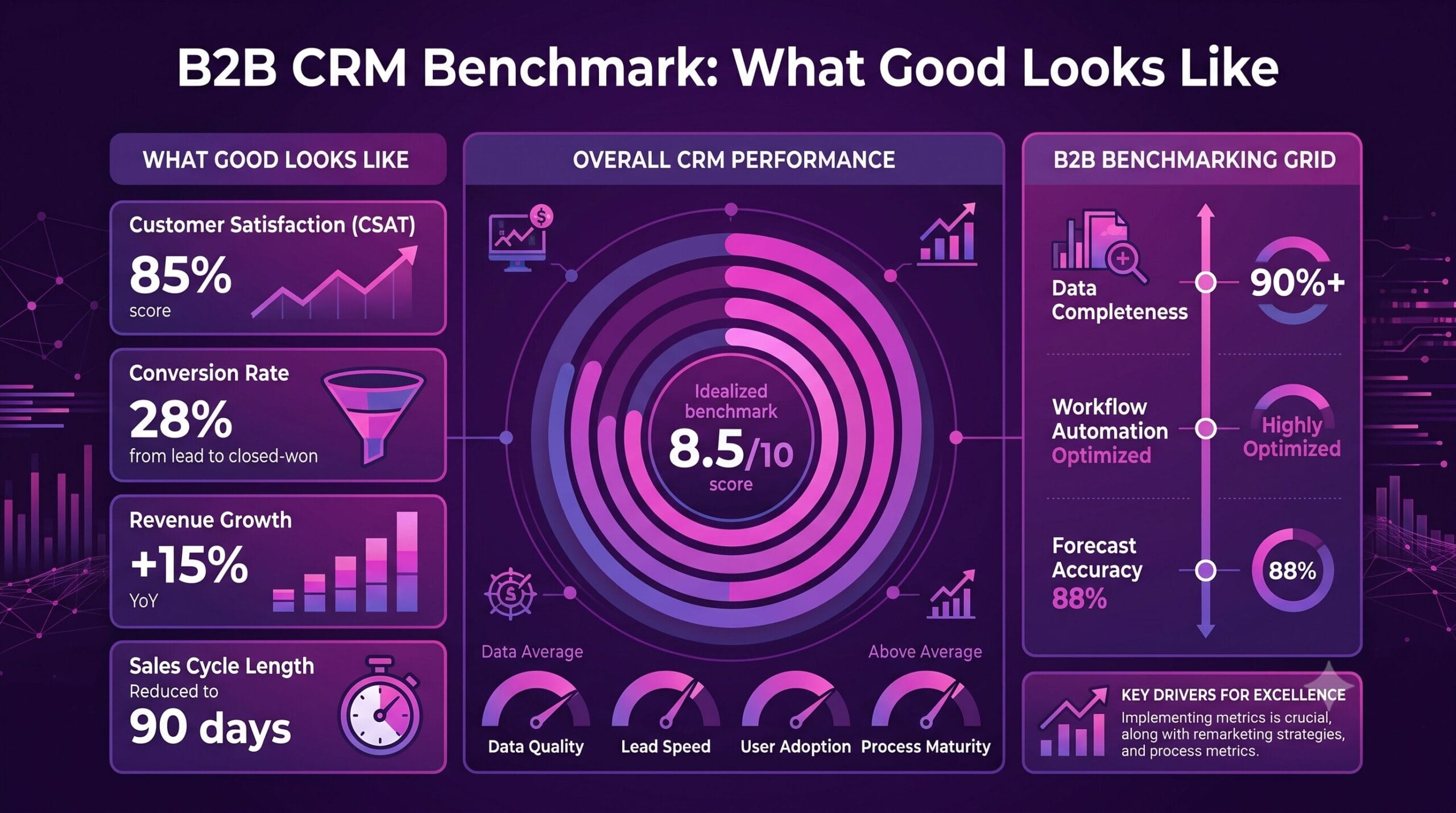
B2B CRM Benchmark: What Good Looks Like

Most CRM problems do not start with the platform. They begin when leadership poses a reasonable question. Are we actually getting value from this system. A useful b2b crm benchmark helps answer that with evidence not assumptions. It shows whether your CRM is improving pipeline visibility sales execution service coordination and decision making. Or simply collecting records while teams work around it.

For mid market and enterprise organizations that distinction matters. CRM rarely stands alone anymore. It sits at the center of revenue operations customer service compliance workflows analytics and increasingly AI driven processes. When performance weakens the cost appears everywhere slower cycles unreliable forecasts duplicate work low adoption poor operational clarity.

What a B2B CRM Benchmark Should Actually Measure

A mature CRM benchmark avoids vanity metrics alone. Logging activity volume or counting contacts reveals very little by itself. The stronger path assesses CRM performance across five connected dimensions adoption data quality process execution commercial impact adaptability.

Adoption comes first as a signal yet it needs careful reading. High login rates can appear healthy while core opportunity stages stay incomplete or sales teams update records only before forecast calls. Real adoption means the CRM forms part of how work happens sellers trust it managers coach from it cross functional teams treat it as a shared operating layer.

Data quality forms the second dimension and it often reveals deeper structural issues. When account hierarchies stay inconsistent lead sources prove unreliable duplicates multiply or fields fill differently across regions reporting loses credibility fast. In regulated industries poor CRM data also creates governance and compliance risk.

Process execution counts just as much. A CRM can hold clean data and still underperform if workflows grow too rigid handoffs stay unclear or automations fail to match how teams actually operate. The benchmark should test whether the platform supports critical processes lead routing opportunity management approvals renewals case resolution partner collaboration without unnecessary friction.

Commercial impact draws executive focus. Is the CRM helping improve conversion rates shorten sales cycles increase retention strengthen forecast accuracy. The answer is not always immediate. CRM value often depends on surrounding process maturity. Still any enterprise benchmark should connect platform health to business outcomes.

The final dimension is adaptability. A CRM built for last year’s structure may not support today’s go to market model service model or data strategy. If every change requires excessive custom work user resistance or reporting workarounds the system may stay technically functional but strategically limiting.

Core Metrics That Make a CRM Benchmark Credible

A b2b crm benchmark gains usefulness when it combines behavioral metrics with outcome metrics. Looking at one without the other creates false confidence.

User adoption: Move past active users. Review role based adoption by sales service management operations partner teams. Measure record completeness by object stage progression consistency whether teams use the system in real time or retrospectively. A CRM updated days later is not a reliable operating system.

Data quality: Metrics should include duplicate rates missing critical fields invalid values account ownership gaps sync integrity across connected systems. If your CRM integrates with ERP marketing automation service platforms or finance tools the benchmark should also examine how often records fail to sync or create conflicting versions of the truth.

Pipeline health: Most organizations already track pipeline volume and stage conversion but benchmark quality comes from consistency. Are opportunity stages defined and used consistently across business units. Are close dates meaningful. Is pipeline aging visible enough to support action before deals stall. Benchmarking here often reveals whether CRM processes support sales discipline or mask weak execution.

Forecasting accuracy: Teams should assess forecast accuracy by manager region product line quarter. A CRM that supports accurate forecasting does more than store opportunities it enables structured judgment better data capture stronger management routines.

Automation performance: Review how much manual work remains in routing assignment approvals notifications quote support follow up tasks customer lifecycle triggers. More automation is not always better. Poorly designed automation creates noise and distrust. The benchmark should focus on whether automation reduces effort while improving consistency.

Service and post sale metrics: These belong in the conversation especially for account based or recurring revenue models. Case resolution times handoff quality renewal visibility customer health tracking these often separate organizations with a transactional CRM from those using it as a coordinated customer platform.

Why Benchmarks Fail Inside Enterprise Organizations

The most common benchmarking mistake compares one company to a generic industry average. That can mislead. A healthcare company managing compliance heavy workflows should not expect the same CRM behavior as a fast moving software business a global manufacturer with channel complexity will not benchmark the same way as a direct sales organization.

The better comparison lies between your CRM design and your actual operating model. If your sales motion is consultative long cycle multi stakeholder your benchmark should reflect that. If service quality and regulatory traceability matter as much as pipeline speed those priorities need weight in the assessment.

Another common issue treats platform limitations as the root cause when the real problem is governance. Poor ownership unclear field definitions inconsistent process training fragmented reporting logic can undermine even a well implemented CRM. In those cases buying more functionality will not solve the benchmark gap.

There is also the opposite risk over customization. Enterprise teams often respond to complexity by building layers of exceptions into the system. Over time that creates admin burden weak usability fragile reporting. A strong benchmark should highlight where customization supports business value and where it compensates for process ambiguity.

How to Run a Practical CRM Benchmark

Start with business priorities not features. If leadership focuses on forecast reliability commercial productivity or customer retention define the benchmark around those outcomes first. Then trace backward into the CRM behaviors data structures workflows that influence them.

Next segment the analysis. Benchmarking at a company wide level can hide important differences between teams regions business units. One sales organization may have strong adoption and weak data discipline while another has clean records and weak forecasting behavior. Segmenting helps you find the real operational patterns.

It is also worth combining quantitative review with stakeholder interviews. CRM dashboards can show low completion rates but they will not always explain why. Sometimes the issue is poor UX duplicated effort across systems missing mobile functionality a workflow that conflicts with how teams actually manage customer relationships. Human insight matters here.

Then assess integration architecture. Many CRM issues are not caused by CRM alone they come from fragmented surrounding systems delayed syncs weak master data management inconsistent business logic across platforms. If your CRM is expected to power analytics service coordination AI use cases integration quality has to be part of the benchmark.

Finally prioritize actions by impact and feasibility. Some issues can be fixed quickly through governance changes role based training field rationalization. Others require deeper platform redesign process reengineering integration work. A good benchmark does not just diagnose. It creates a decision path.

What Good Looks Like in Practice

A healthy CRM environment is usually less dramatic than people expect. It does not mean every dashboard is perfect or every workflow is automated. It means leadership trusts the data enough to make decisions from it users can complete critical tasks without friction the system can evolve as the business changes.

In practical terms good looks like clean and governed customer data clear opportunity management dependable forecasting useful automation reporting that reflects operational reality. It also looks like alignment between technology and process. Not a CRM forcing unnatural behavior. Not a business relying on spreadsheets to fill structural gaps.

For organizations with complex requirements the benchmark should also confirm that the CRM supports scale without losing control. That includes auditability role based access standardized workflows where needed flexibility to support business unit differences where they are justified. Technology with intention matters most when complexity increases. At Nuvolar, we always help you find the technology that best suits your company’s needs.

A mature benchmark is not a scorecard to impress stakeholders. It is a management tool. Used well it helps transformation leaders decide whether they need configuration improvements stronger governance smarter integration or a broader redesign of the customer ecosystem. That is where experienced partners like Nuvolar can create real value not by adding complexity but by aligning CRM architecture with business reality.

The most useful question is not whether your CRM is good or bad. It is whether it is credible enough to guide action. If your teams hesitate to trust the data challenge every forecast rely on side systems to do essential work your benchmark is already telling you where to look next.

Can AI Improve Compliance at Scale?

A missed sign-off or policy exception nobody wrote down, a customer record handled outside the usual steps, these create more than day to day headaches. In regulated industries tiny breaks in process don’t stay small for long. They turn into audit findings, penalties, damage to credibility. That reality is why more leaders keep circling back to a straightforward question. Can AI strengthen compliance in a way that’s measurable, defensible, able to hold up over time.

Yes it can. Though not by swapping governance for automation. AI improves compliance when it sits inside clear controls, runs on dependable data, has obvious ownership. Put to work the right way it spots risk earlier, cuts down the volume of manual checking, brings steadier oversight to complicated operations. Handled carelessly it introduces fresh risk at the same pace it promises efficiency.

The Scale Problem in Modern Compliance

Compliance is often a scale problem. Policies get revised. Regulations shift. Teams work across regions, departments, systems that were never built to align. Even well run organizations end up leaning on spreadsheets, long email threads, scattered review steps to keep up with obligations that demand accuracy.

AI can help because it moves through large amounts of structured and unstructured material faster than classic rule only workflows. It flags transaction outliers, spots missing paperwork, labels sensitive information, watches user behavior, picks up patterns that suggest noncompliance before the issue becomes a formal incident.

That speed and coverage matter most where timing and traceability are non negotiable. In healthcare and life sciences AI can assist with document checks, consent verification, adverse event monitoring. In financial services and insurance it tightens surveillance of transactions, improves adherence to internal policies. Manufacturing, transportation, aviation: it supports verification of procedural compliance across distributed teams and mixed systems.

But speed isn’t the main prize. Consistency is. AI applies the same logic across thousands of records, interactions, operational events without the fatigue, drift, judgment swings that show up in manual review.

Key Operational Use Cases for AI

In practice the strongest use cases cluster into a few areas. First comes monitoring. AI can continuously scan logs, communications, forms, claims, case activity for behavior that doesn’t match what’s expected. When activity volumes are too high for human only review to be realistic that kind of ongoing assessment becomes especially useful.

Second is classification and routing. Compliance teams often lose time simply figuring out what they’re looking at and who should handle it. AI sorts incidents, ranks exceptions, sends them to the right reviewers faster.

Third is documentation quality. With natural language processing AI reviews contracts, policies, disclosures, case notes to find missing terms, conflicting phrasing, content that no longer lines up with current requirements.

Fourth is regulatory change management. AI compares new regulatory text with existing policies or workflows, points out areas that likely need attention. It doesn’t replace legal judgment but it gives teams a quicker place to start.

These gains land hardest when compliance is built into the systems people already live in, not bolted on as a separate layer. If teams work in Salesforce, Zoho, ERP tools, custom software, document platforms: AI should support compliance inside those environments where the work actually gets done.

Addressing the Data and Explainability Gap

Using AI for compliance isn’t the same thing as running a compliant organization. The gap between the two matters. Models learn from data, and operational data is rarely clean, complete, neutral. If records are inconsistent, past decisions reflect bias, process definitions are shaky; AI can repeat those same weaknesses just faster. A model that looks great in a controlled test stumbles in production because the source systems don’t capture the full context.

Explainability is another pressure point. In many regulated settings it’s not enough that an alert fired. Teams need to show why it fired, what evidence supports it, what happened next. If AI driven decisions can’t be explained to auditors, regulators, internal stakeholders, customers: confidence evaporates.

That’s why governance is not optional. Clear ownership, model oversight, access control, audit trails, retraining rules, human review steps have to be visible. AI speeds up detection, supports decisions; but accountability still has to be easy to trace.

Designing a Unified Compliance Architecture

For most enterprises the sensible approach is to treat AI as one part of a wider compliance architecture. Not a standalone product. It can improve compliance without increasing risk. But only with deliberate execution. Start with process clarity. If compliant behavior isn’t defined within a specific workflow AI has nothing stable to reinforce. Before introducing models it helps to map decision points, policy dependencies, escalation routes, the data sources that actually determine outcomes.

Next is integration. Compliance signals are usually scattered across CRM systems, document repositories, support tools, finance platforms, custom apps. AI becomes more effective when those sources connect and carry context. A disconnected model might catch isolated problems; an integrated one shows patterns across operations.

Then comes human centered design. Compliance tools fail when people don’t trust them or can’t act on them quickly. Alerts have to be relevant, screens have to support action, escalation has to match real operating practice. Human insight isn’t a backup plan; it’s part of the blueprint.

This becomes even more important in enterprise settings with layered approvals, cross functional responsibility, regional variations. A technically impressive model that ignores how work truly moves through the organization creates noise. Not control.

Choosing the Right Starting Point

Executives don’t need to begin with a sweeping transformation. A stronger starting point is one compliance process where the volume is high, the risk is clear, oversight is currently too manual to keep up. That might be customer onboarding, claims review, pharmacovigilance intake, contract validation, user access monitoring, quality documentation. The best first target is often a process where missed issues are costly, extra alerts are tolerable, improvement can be tracked in time saved, consistency gained, risk exposure reduced.

From there the questions stay practical. Is the underlying data dependable enough for model performance? Can AI outputs be explained and audited? Will the process owner support operational change, not only a technical rollout? Does the solution fit the tools employees already use?

Those aren’t side details. They decide whether AI reduces confusion or adds another layer of complexity. A strong partner matters here, especially when compliance connects directly to CRM workflows, custom applications, enterprise data architecture. That’s where a company like Nuvolar contributes: tying strategy, engineering, adoption into a single delivery approach instead of treating AI as a one off experiment.

From Reactive Checklists to Continuous Oversight

Traditional compliance is reactive by design. It leans on periodic reviews, manual sampling, cleanup after the fact. That setup is harder to defend when businesses operate in real time across many platforms and jurisdictions. AI nudges the model toward earlier detection, continuous oversight. Rather than waiting for audits to surface gaps teams see anomalies as they develop. Rather than reviewing every case by hand experts focus attention where the risk signal is strongest. Rather than chasing documentation across systems teams build traceable workflows that support accountability from the beginning.

None of that makes compliance effortless. It makes it more workable. So the real question isn’t only whether AI can improve compliance. It’s whether an organization is ready to apply AI with enough discipline to improve outcomes without weakening trust. The winners won’t be the companies using the most AI. They’ll be the ones using it with intent, inside a governance model that can grow.

Often the best way in is smaller than people expect: one process, one risk area, one measurable outcome. Get that right and AI becomes more than a technical update. It becomes a practical advantage in how responsibility, risk, growth are managed.

Posted in AI

Adapting Zoho for Business Complexity

Tailoring Zoho for Enterprise Complexity: Moving Beyond Out-of-the-Box Configuration

Zoho looks simple on the surface. Your operation, though, rarely is. When configuration alone stops cutting it, building on Zoho turns into a choice about how the business works, not merely how the software gets set up. Mid-market and enterprise groups balancing compliance, layered workflows, older systems, and data shared across teams find the payoff comes less from piling on extra tools and more from bending Zoho around the way work actually happens.

Zoho built its position by reaching across most day-to-day operations. CRM sits beside finance, service, analytics, marketing, custom apps, and automation inside one environment. Yet leaders keep circling back to a sharper question: whether those pieces can match the exactness teams require without adding drag.

Zoho development means stretching the platform past its out-of-box limits. That covers custom functions, purpose-built modules, adjusted screens, connections through APIs, data structures, permission schemes, and orchestrated workflows, plus entire applications created inside Zoho Creator. Practically this lets a sales flow with intricate approvals run the way it should, lets service staff reach the needed records at the right instant, and stops finance, operations, and sales from pulling from mismatched numbers. It also helps platform owners steer clear of that gradual slide where an implementation loses traction and ends up half-used.

Most day-to-day headaches do not stem from one missing feature. They surface when the software’s design sits at odds with how the company really operates. When the platform fails to mirror existing processes, people patch together their own fixes, and those fixes quietly raise risk while eroding visibility and consistency.

For simpler needs, the standard tools already cover plenty of ground. A smaller firm running a straightforward pipeline with modest integration demands can often stay inside native modules, preset rules, and basic reports. That works fine. Not every company needs deeper tailoring.

The picture shifts once multiple units, local regulations, sensitive data, or cross-department service models enter the frame. A standard setup then feels either too tight in one area or too open in another. Teams either cannot lock down the process or they carve out exceptions that slowly hurt adoption. A healthcare provider might need separate visibility rules for clinical, operational, and commercial users. A manufacturer could require CRM figures linked to order status, support records, and field activity. Aviation or insurance groups often need audit trails and workflow controls that basic settings cannot fully deliver.

In each situation development lets the platform follow operational reality instead of forcing the business to simplify itself to match the software. This architectural alignment is a well-documented necessity in scaling organizations; as noted in Harvard Business Review’s analysis on legacy tech and cloud transformation, the true value of enterprise software is unlocked only when systems are deeply adapted to specialized operational realities rather than forcing teams into generic workarounds.

The clearest reason to invest in development is usually not about adding features. It is about stripping away friction for users while giving the organization tighter oversight. Thoughtful changes can shorten handoffs, cut repeated data entry, sharpen forecasts, and give leaders a steadier picture of performance. They can also tighten governance: approval steps, validation checks, and permission settings designed with care mean fewer mistakes and stronger assurance for compliance teams.

Customization does not always help. Too much of it can make later adjustments harder, especially when changes are added piecemeal without clear records. The aim stays narrow: adjust only what clearly lifts execution, data quality, or growth. That is where an experienced partner earns its keep. A good one will push back on requests that simply recreate old inefficiencies inside the new system. Sometimes the better step is rethinking the process itself, or adding a light connection, or building a custom piece only when the business model truly stands apart. The decision rests on the concrete effect on daily work and results.

High-Return Focus Areas for Zoho Development

  • Advanced CRM Engineering: Many CRM rollouts run but never quite track how deals progress, who carries responsibility, or where revenue risk actually sits. Targeted modules, guided steps, automatic stage moves, quote handling, and account structures can close that distance. Revenue leaders gain clearer pipeline views and less need to interpret numbers by hand. Front-line staff face fewer clicks and more obvious next actions.

  • System Interoperability: Most larger setups already run several systems. CRM must link to ERP, billing, support, marketing, documents, warehouses, and industry tools. Without solid ties, staff spend time jumping between screens and reconciling records. Development turns those links into reliable flows with proper exception handling, clear ownership, and consistent reporting, rather than leaving behind silent points of failure.

  • Bespoke App Extensions via Zoho Creator: When a process refuses to fit inside standard CRM or service tools, Zoho Creator lets teams create a focused application that stays inside the larger environment. Inspections, field tasks, internal requests, onboarding steps, inventory flows, and regulated reviews can sit close enough that data moves cleanly and reporting stays unified.

  • Intentional Automation: Automation draws attention quickly, yet it can add confusion if the underlying process stays murky. Strong work starts by mapping the logic first: what fires the action, who receives notice, what data updates, and where a person still needs to step in. In regulated settings that often means checkpoints, escalation routes, and audit trails remain part of the design. The useful systems are not those with the most automation, but those where automation backs judgment instead of replacing it.

Projects that hold up over time begin with a clear picture of how work currently runs. Teams map workflows, pain points, roles, data needs, and business rules before any build starts. Architecture choices then consider growth: which objects stay native, which become custom, where data resides, what needs real-time sync versus batch updates, and how permissions will shift as the organization expands. Separating urgent work from optional tweaks also helps. Early results build confidence, especially after uneven adoption, and a phased plan usually beats one large release.

Testing often receives less attention than it deserves. In complex settings, flows can behave differently across roles, locations, or edge cases. Checking only the straightforward path leaves problems that surface later and cost more to fix. Thorough testing forms part of ongoing governance.

Technical skill matters when selecting a partner, yet the real distinction lies in whether that partner can connect platform details to actual business results. Decision makers need systems that support growth and clarity, not code for its own sake. A capable partner will ask direct questions about process design, adoption hurdles, reporting trust, and integration points. They stay comfortable weighing trade-offs and deciding when to build, when to configure, and when to simplify. They also plan past launch, because a platform that works on day one can still drift if support, training, and oversight stay thin.

That longer view matters most for groups operating across markets or under complex rules. Early platform choices can either open room for scale or quietly close it off. The strongest development work stays nearly invisible. Users notice smoother steps and fewer obstacles. Leaders notice cleaner data and systems that keep up with the business. When teams begin to outgrow standard setup, that may simply show the organization has reached the point where more deliberate design makes sense.